


A Different Approach to Improving Data Quality: Flexibility and Feedback
Disadvantages of mandatory fields:
Traditionally, mandatory fields are used in systems to ensure that users complete all required data. However, this can lead to issues, such as entering random or incorrect values to bypass requirements, e.g., a -, so the field is marked as filled by the system. The result is an apparent improvement in data quality, while in reality, the reliability of the data is undermined.
Flexibility and user experience:
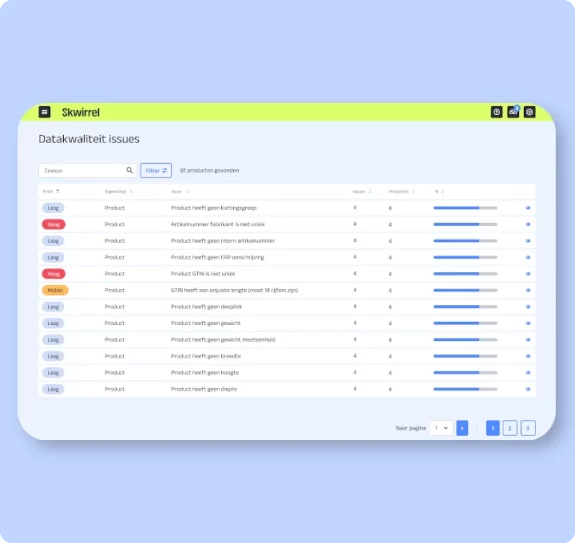
At Skwirrel PIM, we chose a different approach. Instead of mandatory fields, data fields can be classified by severity, such as "low, medium, high, critical." Based on this classification, users can decide which fields must be filled. This provides flexibility to assess which data is essential for their specific needs and which can be considered optional.
Feedback and insights:
To guide users in making the right choices, we have built clear feedback mechanisms into our PIM system interface. Fields classified as critical are prominently displayed, ensuring users are immediately aware of the most important data to fill. This prevents users from entering useless or incorrect information to bypass obligations.
Monitoring and action:
To continuously monitor data quality, we provide a dashboard giving an overview of all data quality issues. This allows users to proactively take action and address any problems.
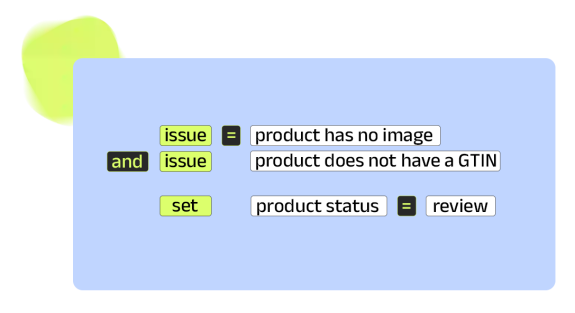
Additionally, we have implemented an advanced trigger system that can automatically adjust statuses based on data quality. Users can immediately respond to identified issues and take necessary corrective measures. The trigger system is easy to use, yet highly effective.
Trigger system:
With our trigger system, users can set rules to automate data-related tasks. This simplifies data management and increases efficiency by minimizing repetitive tasks and preventing errors. The system responds directly to predefined events, enabling timely decisions without constant manual monitoring. With customizable rules, the system provides a flexible data management solution perfectly tailored to the needs of any organization. This promotes organized, up-to-date data.
Practical approach:
To start using this method, you need to clearly know which fields are important for your organization. The easiest way is to first visualize the process in a tool like Visio. This helps understand which elements are connected.
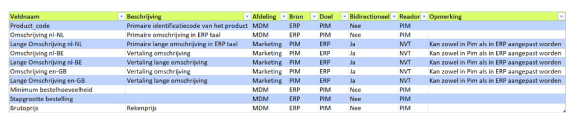
Next, create an Excel file documenting the source of a field, where this data is needed, and where it can be changed. If a field can only be changed in the ERP system, it is marked as "Read Only" in our PIM system. This clarifies for users where data should be updated and prevents incorrect modifications that may overwrite other information.
Basic steps:
Process visualization in a tool like Visio:
- Map the process to be analyzed
- Identify steps and interactions between systems and departments
- Note which data fields are used and transferred at each stage
Create Excel for data field management:
- Create a clear table in Excel to document data fields
- Columns may include the following information:
- Data field name
- Description of the data field
- Source of the data field (e.g., ERP system, PIM system, CRM, etc.)
- Where the data field is used (in which processes, systems, or departments)
- Whether the data field is readable or editable at each location
- Any restrictions or rules regarding the data field
Manage Data Field Accessibility:
- Based on the Excel file, you can determine which data fields in the PIM system should be marked as “read-only” and which can be edited in the ERP system.
- Provide clear guidelines for end users on where and how they can modify data fields.
Test and Refine:
- Implement the new data field management method in your organization
- Monitor how well the system works and collect feedback from employees
- Adjust the process as needed to resolve any issues
Conclusion:
At Skwirrel, we believe improving data quality requires a balance between user flexibility and targeted feedback. By avoiding mandatory fields and using classification and feedback instead, we empower users to make conscious decisions while maintaining data integrity. Our approach enhances the user experience while safeguarding data quality.
Curious about all the features of our PIM system?
- DAM (Digital Asset Management)
- API
- ETIM
- Custom Classes
- etc..
Relevante blogartikelen


Experience what we can do for you? Contact us for information, advice and enthusiasm.